Showing posts with label Notifications. Show all posts

Wednesday, January 16, 2013

Apple Passbook and American Express Spending Meter


If you read I spent how much this month!?!?, let's consider this "I spent how much this month, 2.0." If you have an Apple iPhone with iOS 6 or higher and an American Express card, there's another option besides SMS or email for spending meters and transaction notifications. In what is often the norm for Apple products, the solution is slick and easy to use.


What you need
  • Apple iPhone, iPod Touch, or iPad with iOS 6 or higher
  • American Express charge or credit card
  • Online access to your American Express account
How to get started
  • Visit the American Express passbook site using Safari from an Apple device running iOS 6 or higher
  • Complete the form on the landing page and follow the instructions on the American Express site
How to use
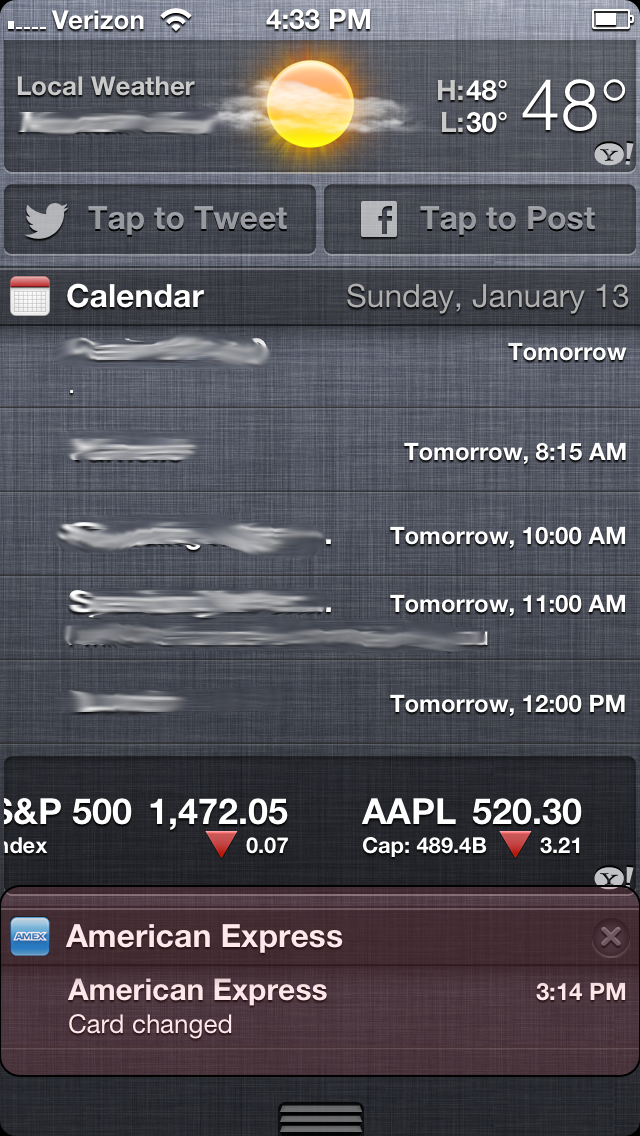
That's it! Every time you use the American Express card you registered, you'll receive a notification with both the transaction amount and the new balance.

You'll also see a section in the notifications pull down.
Conclusion
Not surprisingly, Apple has provided a visually-appealing platform to track both transactions and card balance. There are a number of ways to make the most of this functionality:
  • Increase security with real-time monitoring of fraudulent transactions
  • Monitor your balance and the effect on your budget
  • Limit the American Express card for a certain category of purchases, e.g. business expenses, and track the balance of the purchases within the select category
  • Others?

Wednesday, January 9, 2013

I spent how much this month!?!?

A Shocking Situation
Have you ever looked at your credit card or bank statement and thought, "I spent how much this month?!?!"

Join the club.


I like surprises, not shocks. Fortunately, I was pleasantly surprised to find out that most banks and credit cards offer a spending meter. A spending meter is a notification from your bank or credit card that notifies you of your balance once you hit a pre-defined amount. You can choose to receive the message via SMS or email, and it's only sent when you hit the pre-defined amount. It's a great tool to keep track of your balance and performance against budget.


What you need
  • Mobile or online access to your bank and/or credit card
  • Smartphone
How to get started
  • American Express
    • Log into your American Express online account
    • Click on “Profile & Preferences” in the top menu bar
    • Click on “Spending Alerts” (under the “Account Alerts” section)
    • Set the slider for “Spend Tracking” to “On”
    • Set the amount to $200
    • Note: you may be required to verify your email address and/or mobile phone number, depending on your selection.
  • Capital One
    • Log into your Capital One online account
    • Hover over “Messages & Alerts” from top menu bar
    • Click on “Set Alerts” from drop-down menu
    • Click on the “Enable” checkbox for “Balance above $”
    • Set the amount to $200
  • Chase
    • Log into your Chase online account
    • Click on “Manage Account Alerts” from the right hand navigation
    • Click on the relevant checkbox for the row labeled “My balance reaches ($ USD)” under “Daily Alerts”
    • Set the amount to $200
    • Click on the “Update Alerts” button
  • Discover
    • Log into your Discover online account
    • Click on “Account Profile” in the top menu bar
    • Scroll down to "Track Your Spending" under the "E-mail and Mobile Reminders" heading
    • Click the “Sign Up” button to the right of "Balance Exceeds Amount"
    • Under the "E-mail and Text Reminders" heading, click the + button to expand the "Track Your Spending" options
    • Check to select email and/or text notifications for "Account Balance
    • Exceeds a Specified Amount" and enter $500 in the box ($500 minimum for notifications) 
How to use
  • That's it! Your bank or credit card will automatically send a notification to your email or mobile phone when you reach the pre-defined amount.
Conclusion
Never get caught off guard by your balance or statement. The spending meter is a nifty service offered by most bank and credit card accounts and best of all, it's free!