Showing posts with label Everybody. Show all posts

Wednesday, January 16, 2013

Apple Passbook and American Express Spending Meter


If you read I spent how much this month!?!?, let's consider this "I spent how much this month, 2.0." If you have an Apple iPhone with iOS 6 or higher and an American Express card, there's another option besides SMS or email for spending meters and transaction notifications. In what is often the norm for Apple products, the solution is slick and easy to use.


What you need
  • Apple iPhone, iPod Touch, or iPad with iOS 6 or higher
  • American Express charge or credit card
  • Online access to your American Express account
How to get started
  • Visit the American Express passbook site using Safari from an Apple device running iOS 6 or higher
  • Complete the form on the landing page and follow the instructions on the American Express site
How to use
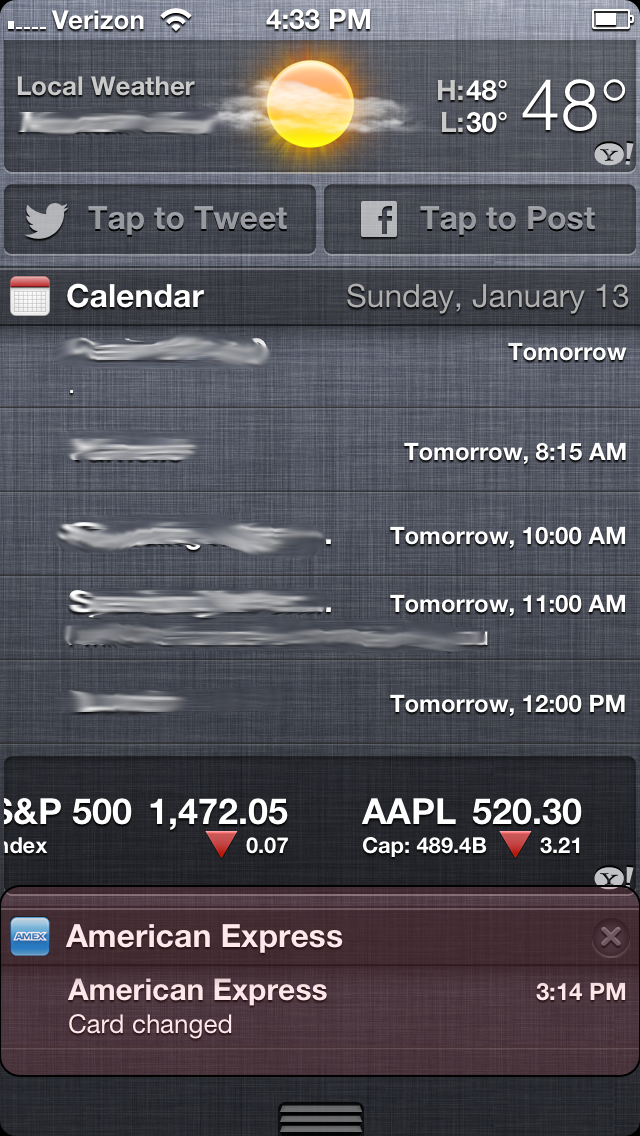
That's it! Every time you use the American Express card you registered, you'll receive a notification with both the transaction amount and the new balance.

You'll also see a section in the notifications pull down.
Conclusion
Not surprisingly, Apple has provided a visually-appealing platform to track both transactions and card balance. There are a number of ways to make the most of this functionality:
  • Increase security with real-time monitoring of fraudulent transactions
  • Monitor your balance and the effect on your budget
  • Limit the American Express card for a certain category of purchases, e.g. business expenses, and track the balance of the purchases within the select category
  • Others?

Monday, January 14, 2013

It's 2013. Why are we still using paper receipts? Part 2 of 2


To summarize part 1, paper-based receipts are a necessary evil-- inconvenient and archaic, but still necessary for a variety of important transactions. For anyone who has been in a situation where a receipt was necessary, only to find it inaccessible, or worse, misplaced, read on!


What you need
How to get started
  • If you don't already have an Evernote account, sign up here
  • Install the Evernote app on your mobile device
  • [Optional] Create a notebooks named "Receipts"
  • [Recommended] Allow location services
Getting receipts into Evernote
  • Open the Evernote app
  • Select the notebook for receipts
  • Select the add note button in the upper right hand corner
  • Select the camera icon on the top menu bar
  • Capture an image of the receipt

Using Evernote for receipt management
  • Multi-channel access - access an image of any receipt via mobile, web, or desktop application
  • Search - Evernote will scan all the text in the receipt and enable searching on the text. So if you purchase a plush toy from Toys 'R Us, simply search keywords such as "plush" or "toys."
  • Geo-tagging - as long as location services are enabled, Evernote will automatically tag the address and city where the receipt was photographed.
  • Organization - use tags to organize receipts. Sample tags include: "tax deduction," "share," "2012," "claim for HSA," etc.
  • Sharing - share receipts with family and friends. This is useful when a spouse is trying to return an item you purchased or for comparison shopping.
  • Consolidation - forward all online receipts to your Evernote email to store all receipts in a single repository.

Conclusion
At some point in the future, most receipts will be full functional eReceipts. In the interim, we're stuck with paper-based receipts that harm the environment, damage our health, clutter our wallets, and disappear when they're actually needed. While it requires a bit of extra effort on our side, digitizing receipts using tools like Evernote represent a step in the right direction.


Also consider
  • Neat.com
  • Expensify
  • Piikki
  • Shoeboxed
  • Lemon
  • Slice
  • One Receipt
  • JotNot
  • Receipt-Bank

Sunday, January 13, 2013

It's 2013. Why are we still using paper receipts? Part 1 of 2


In 2012, we saw amazing advances in technology. From the Curiosity Rover on Mars to the rise of crowdfunding. On the personal technology front, we saw the rise of social and wireless personal fitness devices and smartphone adoption surpassing the 50% mark. Yet, we're still using paper-based receipts. Granted, some retailers are starting to make progress, but the vast majority of receipts are still paper-based affairs.

If you think paper-based receipts are perfectly fine and have never had a problem with paper-based receipts, then this blog post isn't for you.


For the rest of us who have forgotten a critical receipt at a return, sent a business receipt through the wash, cluttered up wallets with receipts, or felt that paper-based receipts are a pain, read on!


Receipts are still used in a variety of transactions:

  • Returns or exchanges
  • Taxes (for tax deductions)
  • Rebates
  • Warranty claims
  • Flexible Spending Account (FSA) or Health Spending Account (HSA) claims
  • Coupons/discounts
  • Business expenses
  • Insurance claims
  • Price protection
  • Reconciliation
Receipts are a waste of environmental resources and potentially bad for you:

  • The paper (PDF, page 4) used for receipts consumes trees, oil, and fresh water while emitting CO2 and generating trash.
  • The chemical on receipts (BPA) may have adverse health effects.
Fortunately, there is a better way! Come back tomorrow for the solution.

photo credit: fooishbar via photopin cc